Before-Save vs. After-Save Flows: Choosing the Right Salesforce Automation Strategy
Salesforce automation has changed considerably over the years. What once required a combination of Workflow Rules, Process Builder, and Apex triggers can now often be handled using Flow, which has become the primary declarative automation framework for most implementations. Record-triggered Flows, in particular, let administrators and developers respond automatically whenever a record is created, updated, or deleted — but having a powerful tool doesn't mean every automation should be built the same way.
One of the most important architectural decisions when building a record-triggered Flow is deciding when it should run. Salesforce provides two options: a before-save Flow, configured through Fast Field Updates, and an after-save Flow, configured through Actions and Related Records. At first glance the distinction sounds simple — one runs before the record is saved, the other runs afterward — but in practice the choice has real consequences for performance, database operations, governor limits, recursion, and long-term maintainability.
The short version is that if your automation only needs to change fields on the record that triggered it, a before-save Flow should usually be your first choice. Salesforce specifically optimizes before-save Flows for that scenario, describing them as able to update the triggering record without requiring a separate save, and notes they can run up to ten times faster than the record-change processes they replaced. Understanding why requires a closer look at where each type sits in Salesforce's save process.
Before-Save Flows: Fast Field Updates
A before-save Flow operates while Salesforce is processing a record but before it has been committed to the database:
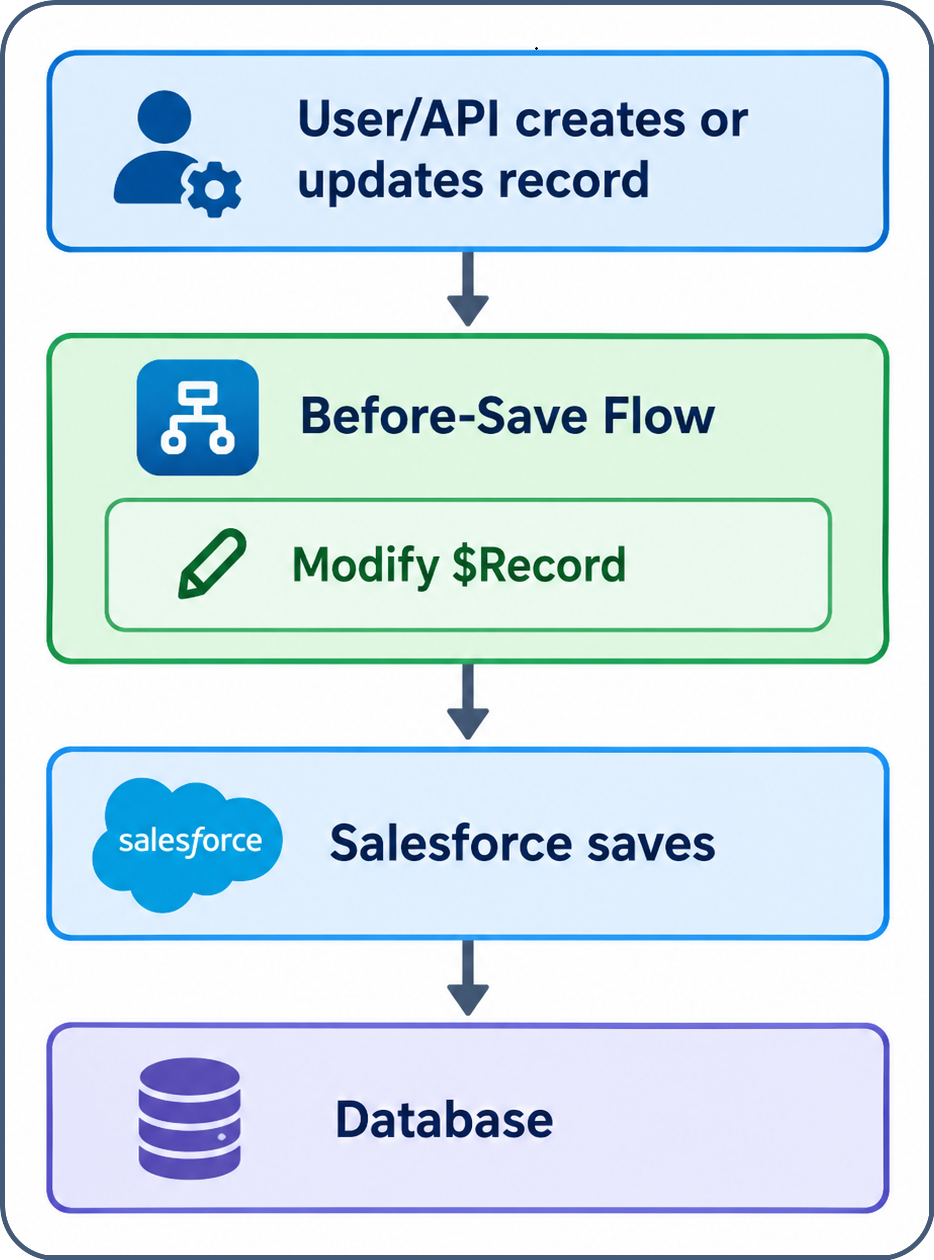
The Flow receives the incoming values through the $Record variable, and if it changes one of those fields, Salesforce simply incorporates that change into the record already being saved. If an Opportunity should automatically receive a priority based on its amount, a before-save Flow can set Priority to "High" or "Normal" directly on $Record — no separate Update Records operation required. Salesforce applies the modified value as part of the original save.
That makes before-save Flows well suited for setting field values, applying defaults, standardizing data, calculating derived fields, performing conditional field updates, and enforcing data-quality rules before the record ever reaches the database. The trade-off is scope: a before-save Flow can only modify the record that triggered it. It can't create or update related records, send emails, or invoke most of the actions available to an after-save Flow — Salesforce currently limits it to elements like Assignment, Decision, Get Records, and Loop. That limitation isn't a weakness, though; it's precisely what makes the before-save Flow efficient.
After-Save Flows: Actions and Related Records
An after-save Flow looks different, because it only runs once the record has already been saved:
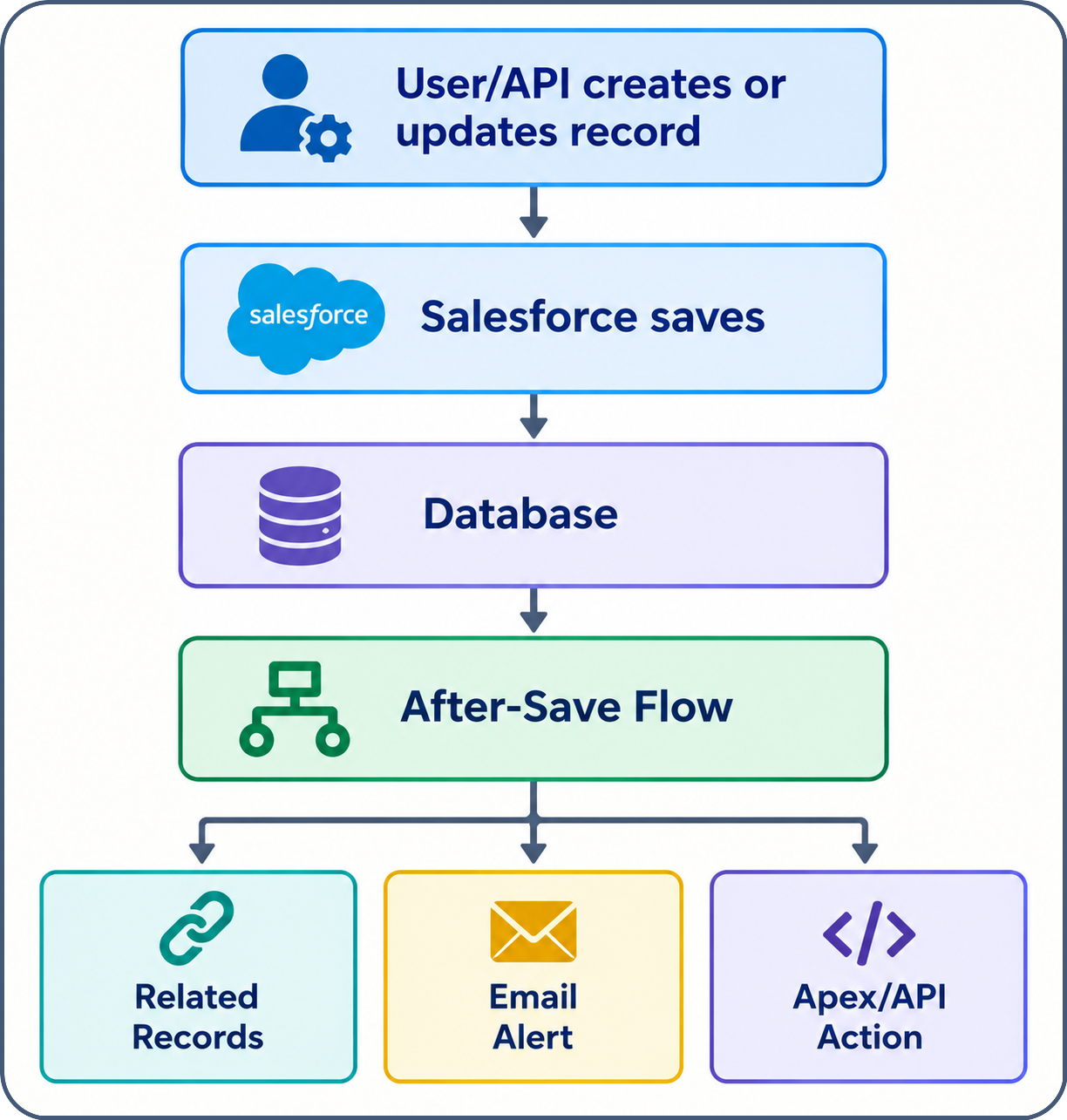
Once the save has happened, Salesforce can provide information that simply doesn't exist yet during the before-save stage — the record's database-assigned ID, or system-populated fields like CreatedDate and LastModifiedDate. That makes after-save Flows the right choice whenever the automation needs to do something beyond changing fields on the triggering record itself. If an Opportunity moving to Closed Won should create a follow-up Task for the Account owner, that Task is a separate record, which immediately puts the requirement outside a before-save Flow's scope. An after-save Flow can create or update related records, update unrelated records, send emails and notifications, invoke Apex, call external systems, and perform the broader set of actions a before-save Flow can't touch. Salesforce specifically recommends this path whenever the automation needs the triggering record's ID, needs to touch other records, or needs to do anything beyond updating the record that triggered it.
The architectural difference comes down to which phase of the save process matches the job the automation needs to do:
| Requirement | Before-Save | After-Save |
|---|---|---|
| Update the triggering record | Yes | Yes |
| Update the triggering record without another save | Yes | No |
| Create or update related records | No | Yes |
| Send email | No | Yes |
| Invoke Apex or another action | No | Yes |
| Access the new record's ID | No | Yes |
| Access post-save system values | No | Yes |
| Best for simple field updates | Yes | Sometimes |
Why Before-Save Is So Much Faster
The performance gap becomes easier to see once you think in terms of database operations rather than Flow types in the abstract. With a before-save Flow, populating a field on an Account requires nothing beyond modifying $Record — the original save continues and carries the change with it. With an after-save Flow accomplishing the same thing, the Account is saved once, the Flow then runs Update Records, and the Account gets saved a second time. That second save isn't free: a Salesforce save isn't an isolated event, it can trigger validation, automation, and other Flows, so an unnecessary update means unnecessary automation processing all over again. Salesforce explicitly cites this as one of the reasons before-save Flows are faster — the modified values ride along with the original save rather than forcing the record through a second one. A single extra update might look insignificant on its own, but multiplied across thousands of records during a data load, that small amount of avoidable work adds up to a real performance cost.
Governor Limits: Think in Terms of Work, Not Just Numbers
It's tempting to summarize the difference as "before-save Flows don't use governor limits," but that isn't quite right — before-save Flows can still run operations like Get Records, which Salesforce explicitly supports there, and those operations still consume platform resources. The more accurate way to put it is that before-save Flows eliminate the need for an additional save of the triggering record when all the automation needs to do is change its fields, which reduces unnecessary database operations and the downstream automation that tends to follow them. That's not a universal exemption from governor limits — it's a narrower, more useful lesson: unnecessary database operations are worth eliminating wherever they aren't actually needed.
Choosing Before-Save: When You're Updating the Same Record
A before-save Flow is usually the right call whenever the requirement can be phrased as "when this record is created or updated, change one or more fields on this same record." That covers a fairly wide range of everyday automation:
- setting a default value, like a starting priority based on a Case's origin;
- standardizing incoming data, such as normalizing phone numbers or text fields;
- combining existing fields into a derived value, like building an internal name from First Name, Last Name, and Account;
- stamping a field conditionally, such as setting an Approval Date the moment Status changes to "Approved"; and
- validating incoming data and preventing a save when a business rule isn't satisfied — something Salesforce's current guidance specifically calls out as a before-save use case.
The common thread across all of these is that the automation changes the record being saved, and nothing else needs to happen as a result.
Choosing After-Save: When the Automation Has Consequences
After-save Flows earn their place whenever the requirement goes beyond modifying the triggering record — they're the place where Salesforce responds to the fact that something has already happened, rather than shaping the record on its way in. If an Opportunity becomes Closed Won, the response might be to create a Task, update the Account, send an email, notify another user, invoke Apex, or reach out to an external system — all actions that occur because the record was saved, not changes to the record itself. Creating or updating a related record is the clearest case: a Task is a separate record, so a before-save Flow simply can't create it, while an after-save Flow can use the newly saved Opportunity's ID to do exactly that. The same logic applies to sending notifications — a Case escalating to a support manager is naturally an after-save concern — and to calling Apex or external systems, which is particularly relevant when the outside system needs an identifier for the record that was just created. The question worth asking isn't whether a before-save Flow could somehow be made to do this; it's whether the operation logically belongs before the record is saved, or is really a consequence of it having been saved. That framing tends to point to the right answer quickly.
The Declarative Alternative to Before Triggers
Historically, a developer might have written a before insert or before update Apex trigger just to populate a field or two:
trigger AccountTrigger on Account (before insert, before update) {
for (Account account : Trigger.new) {
if (account.Type == 'Customer') {
account.Priority__c = 'High';
}
}
}
For straightforward field manipulation like this, a before-save Flow can often express the same rule without any custom Apex at all — the shape of the two approaches is essentially identical, modifying the record directly before it's saved. Salesforce itself draws this comparison, describing before-save Flows as similar to Apex before triggers precisely because they run before the save and can modify the triggering record. That doesn't mean Apex becomes unnecessary; complex algorithms, sophisticated integrations, and functionality Flow simply doesn't support still justify writing code. But for the common case of straightforward field manipulation, a before-save Flow is often the simpler and more maintainable choice.
Reducing Unnecessary Recursion
One of the subtler advantages of before-save automation is that it never needs a second update to the record that triggered it. An after-save Flow that updates its own triggering record sets up a pattern where the record is updated, saved, and then evaluated by the org's automation all over again — whether that actually produces recursion depends on the Flow's conditions and everything else running in the org, but the architecture itself creates another opportunity for cascading automation. A before-save Flow sidesteps that entirely, since modifying $Record doesn't require a second save at all. That doesn't make before-save Flows immune to complex automation chains generally — they can still participate in an org's broader automation and trigger downstream behavior once the record is saved — but when the requirement really is just "modify the triggering record," before-save avoids creating a save purely to persist that change.
Cleaner Maintenance
There's a maintainability benefit here too. In an org with several layers of automation stacked on top of each other — an Apex trigger, a Process Builder process, a Workflow Rule, an after-save Flow that updates the record again, followed by yet another Flow — even if every individual piece works correctly, understanding the full execution path can become genuinely difficult. Moving simple field-update logic into a before-save Flow collapses that into something much easier to follow: the record is created or updated, the before-save Flow sets its fields, and the save completes. Salesforce's own migration tooling reflects this distinction — Workflow Rules that only perform field updates can be migrated directly into before-save Flows, while Process Builder migrations initially become after-save Flows that can later be optimized into before-save ones where appropriate. The goal isn't to force everything into before-save Flows; it's to put each piece of automation into the architectural phase where it actually belongs.
A Simple Decision Framework
When building or reviewing a record-triggered Flow, one question does most of the work: does the automation only modify the triggering record, or does it need to touch other records, send email, invoke Apex, or use information that only exists after the save? If it's the former, before-save is almost always the right choice. If it's the latter — creating or updating other records, sending a notification, calling Apex or an external system, or needing the record's post-save ID or system-generated fields — after-save is the appropriate architecture. This isn't a substitute for understanding the specific requirement in front of you, but as a starting point: same record, field changes, go before-save; other records or actions, go after-save.
Conclusion
Before-save and after-save Flows aren't two interchangeable ways to accomplish the same thing — they occupy different stages of the Salesforce save process and are built for different responsibilities. A before-save Flow is designed for lightweight changes to the triggering record, modifying $Record directly and avoiding an unnecessary second save, which makes it an efficient, often simpler stand-in for many basic before-trigger scenarios. An after-save Flow is designed for what happens because the record was saved — creating and updating related records, sending emails, invoking actions, and doing anything that depends on the record already existing in the database.
That leads to a fairly simple rule of thumb, with the usual caveat that it's a guideline rather than an absolute: if the automation only touches the same record, keep it before-save. Whenever you come across an existing after-save Flow, it's worth asking whether it actually needs to run after the save at all — if the honest answer is "it just changes a few fields on the same record," there's probably an opportunity to refactor it into a before-save Flow. The performance gain is nice to have, but the bigger win is architectural clarity: using the smallest, most appropriate mechanism for the job, rather than reaching for the most powerful option every time.