Consuming REST APIs with Apex: Building Secure, Typed, Testable Integrations
Modern Salesforce applications rarely operate in isolation. Salesforce is a powerful platform for storing and managing business data, but organizations often depend on external systems for information Salesforce simply doesn't own — currency exchange rates, shipping status, inventory levels, weather data, or any number of other real-time sources. Apex is the bridge to those services: it can make an HTTP request, receive a JSON response, and turn that response into data the rest of the application can actually work with.
On the surface, that sounds simple — send a request, get JSON back, process it. The details that actually determine whether the integration is any good live elsewhere: whether credentials are protected, whether the response gets mapped into something usable rather than a pile of untyped maps, whether failures are handled gracefully instead of as surprises, and whether the whole thing can be tested without depending on the external service actually being up. This walks through that process end to end, less as a demonstration of "how to make a callout" and more as a look at how the pieces fit together into something secure and maintainable.
Secure Setup with Named Credentials
One of the first decisions in building an external integration is where the endpoint and authentication information should actually live. The tempting approach is to put the URL and API key directly in Apex:
request.setEndpoint('https://api.example.com/data');
request.setHeader('Authorization', 'Bearer my-secret-token');
This works, but it creates an immediate maintenance and security problem — credentials become part of the application code, rotating a token now requires a code change, and sensitive information has a way of leaking into source control or other places it shouldn't be. Salesforce's Named Credentials exist specifically to separate that configuration from the code that uses it, so Apex can reference a configured connection instead of knowing the underlying credentials at all:
request.setEndpoint('callout:My_Named_Credential/data');
Apex knows which connection to use without ever containing what's needed to authenticate with it. In current orgs, that configuration is typically split across two linked pieces: a Named Credential that defines the endpoint, and a separate External Credential that holds the authentication protocol and details — Salesforce's own guidance now recommends this split over bundling everything into a single legacy Named Credential, since it's more flexible and keeps the authentication piece independently manageable. Either way, the Apex syntax for referencing the connection stays the same, and the benefit is the same too: credentials can be rotated or reconfigured without touching a single line of Apex, and the same connection can be managed consistently across the org.
The exact authentication mechanism — an API key, OAuth, or something else — depends on the external API, and Salesforce's credential framework supports several of these models directly. Some public APIs, like the World Bank's, don't require authentication at all, but a Named Credential is still worth using in that case: even with nothing to authenticate, it keeps the endpoint itself out of Apex and centrally manageable, so a URL change still doesn't require touching the code. The underlying principle is just to keep authentication out of Apex source wherever possible, which has a side benefit beyond security: it keeps the code focused on what it's actually supposed to do — build the request, send it through the configured connection, receive the response, and process the data — rather than mixing that logic in with authentication concerns that belong somewhere else entirely.
Making the Callout
Once the connection is configured, Apex can perform the actual HTTP callout using the Http, HttpRequest, and HttpResponse classes. The HttpRequest represents what's being sent — the endpoint, method, headers, and body:
HttpRequest request = new HttpRequest();
request.setEndpoint('callout:My_Named_Credential/data');
request.setMethod('GET');
request.setHeader('Content-Type', 'application/json');
and Http is responsible for actually sending it:
Http http = new Http();
HttpResponse response = http.send(request);
The result comes back as an HttpResponse, carrying the status code, headers, and body. It's worth remembering at this point that receiving a response doesn't mean the operation succeeded — the request may well have reached the external server and still come back as a 404, 401, 429, or 500. That's exactly why the response needs to be validated before anything tries to process its contents, which is where things go next.
Typed Mapping with Wrapper Classes
REST APIs typically return JSON, and while Apex can deserialize that into a generic Map, doing so tends to produce verbose, fragile code — every value has to be pulled out and cast to the right type by hand, which is manageable for a small response and increasingly painful as the JSON structure grows. A typed wrapper is a cleaner alternative. Given a response like:
{
"name": "United States",
"alpha3Code": "USA",
"capital": ["Washington, D.C."]
}
an Apex class can model that structure directly:
public class CountryResponse {
public String name;
public String alpha3Code;
public List capital;
}
and the JSON can be deserialized straight into it:
CountryResponse country = (CountryResponse) JSON.deserialize(
response.getBody(),
CountryResponse.class
);
From there the rest of the application works with strongly typed properties — country.name, country.alpha3Code, country.capital — rather than casting values out of a map by hand. The wrapper does double duty here: it documents exactly which part of the external JSON the application actually cares about, and it draws a clean boundary between the external API and the rest of the Salesforce code, even when the real API response contains far more fields than the wrapper bothers to model.
Status Code Validation
A successful callout involves more than just getting a response back — external systems go down, return unexpected status codes, or send back something that can't be processed the way you expected, and good integration code treats those as normal possibilities rather than surprises. The usual pattern is to check the status code before attempting to deserialize anything:
Integer statusCode = response.getStatusCode();
if (statusCode >= 200 && statusCode < 300) {
// Process successful response
} else {
// Handle error response
}
The 2xx range generally means success, 4xx means something about the request or authorization was rejected, and 5xx means the problem is on the server's end — the specific codes worth watching for depend on the API, but commonly include 400 for an invalid request, 401 for failed authentication, 404 for a missing resource, 429 for a rate limit, and 500 for a server-side error, though the integration should ultimately follow whatever that particular API's documentation says.
Checking the status code before deserializing matters because an error response often has a completely different shape than a successful one. A success might look like {"name": "United States", "alpha3Code": "USA"}, while an error comes back as something like {"error": "Invalid API key"} — trying to deserialize both into the same wrapper produces confusing results at best. The better pattern is to establish whether the call succeeded first, and only then interpret the response according to the schema you actually expect.
Mock Testing with HttpCalloutMock
There's one more problem to solve: testing this code without actually calling the external API. Unit tests shouldn't depend on an external service being available — it could be offline, rate-limited, inaccessible from the test environment, or simply returning something different than it did yesterday. Salesforce's HttpCalloutMock exists for exactly this situation, letting a mock implementation simulate the response the real service would return:
@IsTest
private class CountryCalloutMock implements HttpCalloutMock {
public HttpResponse respond(HttpRequest request) {
HttpResponse response = new HttpResponse();
response.setStatusCode(200);
response.setBody(
'{"name":"United States","alpha3Code":"USA","capital":["Washington, D.C."]}'
);
return response;
}
}
registered before the code under test runs:
Test.setMock(HttpCalloutMock.class, new CountryCalloutMock());
This lets the test exercise the integration logic without making a real network request, but the more valuable part is that it lets you test scenarios deliberately — a mock can simulate a clean 200 just as easily as a 400, 401, or 500, letting the test confirm the Apex code actually handles each one correctly. That's the difference between callout testing that satisfies Salesforce's coverage requirement and callout testing that verifies the integration actually behaves the way it's supposed to.
Bringing the Pieces Together
Put together, the whole integration follows a fairly linear path:
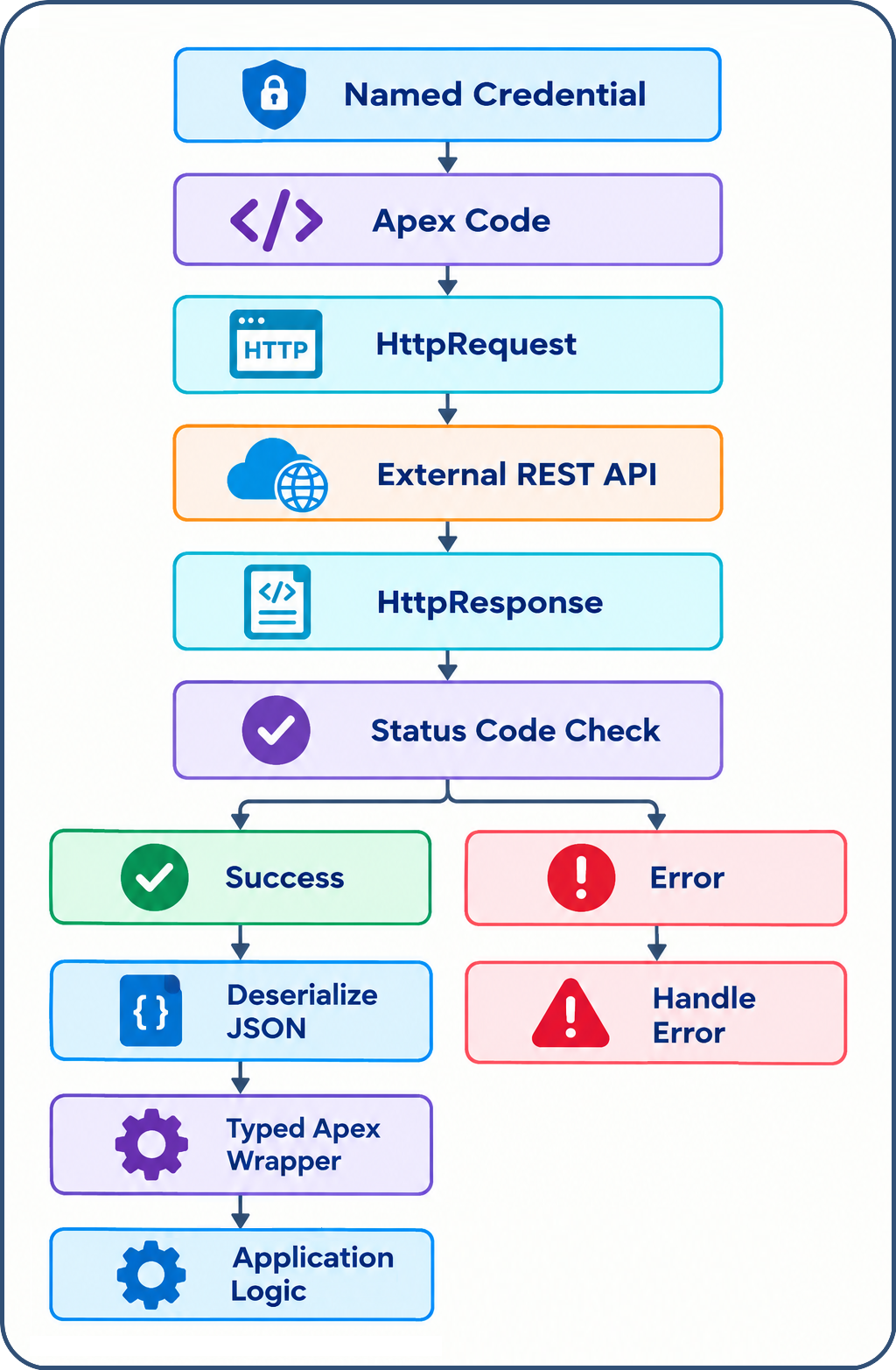
Each stage has one job: Named Credentials keep connection and authentication configuration out of the application code, HttpRequest and Http handle the actual communication, status-code validation decides whether the response should be trusted, wrapper classes turn raw JSON into structured Apex objects, and HttpCalloutMock makes the whole thing testable without depending on the external system being reachable at all.
Exploring the Complete Example
To see this pattern working end to end, I've put together a complete example on Gist using the World Bank's Data360 API. It's public and doesn't require any credentials, so unlike most of the integrations this article discusses, the example can be copied straight into any org and actually run — create a Named Credential pointed at https://data360api.worldbank.org with the Identity Type set to Anonymous, and the callout works with no signup or API key involved. There is a small catch worth knowing about: the API expects explicit query parameters (DATABASE_ID, INDICATOR, and REF_AREA) and won't return anything useful without them, and since the example doesn't filter by a specific time period, it comes back with the entire historical series for the requested country rather than a single current value. The example handles that by deserializing straight into a typed wrapper around the full response, then picking out the one observation flagged LATEST_DATA: true — a reasonably common pattern for APIs that return a time series when what you actually want is the most recent point in it.
Conclusion
None of these pieces are complicated on their own — a callout, a status check, a deserialize call, a mock. What makes an Apex REST integration good isn't any single step, it's making sure each of those concerns stays in its own place: credentials live in configuration, not code; the response is validated before it's trusted; the JSON gets mapped into something typed and specific rather than passed around as a loose map; and the whole thing can be tested without ever touching the real API. Built that way, the integration ends up being not just capable of making a REST call, but secure, maintainable, and safe to change with confidence later.