Event Bubbling in JavaScript: Understanding Event Propagation and Delegation
When you interact with a web page, events such as clicks, key presses, and mouse movements don't necessarily remain confined to the element where they occur. Events propagate through the DOM, allowing elements higher up in the document hierarchy to respond to actions that originated within their descendants. This mechanism, known as event bubbling, is one of the more understated features of browser behavior, but understanding it gives you a much better mental model for how the DOM actually works — and it sets up a genuinely useful pattern called event delegation.
What Is Event Bubbling?
Consider a simple HTML structure where a button is nested inside a list item, which is itself contained within an unordered list:
<ul id="task-list">
<li>
<button class="delete">Delete</button>
</li>
</ul>
If the user clicks the button, the browser identifies the button as the event's target, but the event doesn't stop there. It propagates upward through the button's ancestors, meaning the click can be observed by the <li>, the <ul>, the <body>, and ultimately the document itself. Each ancestor in that chain gets an opportunity to react to the event as it passes through. This upward journey is what we call event bubbling, and the key idea to take away is that an event originating on one element can still be observed and handled by elements much higher in the tree.
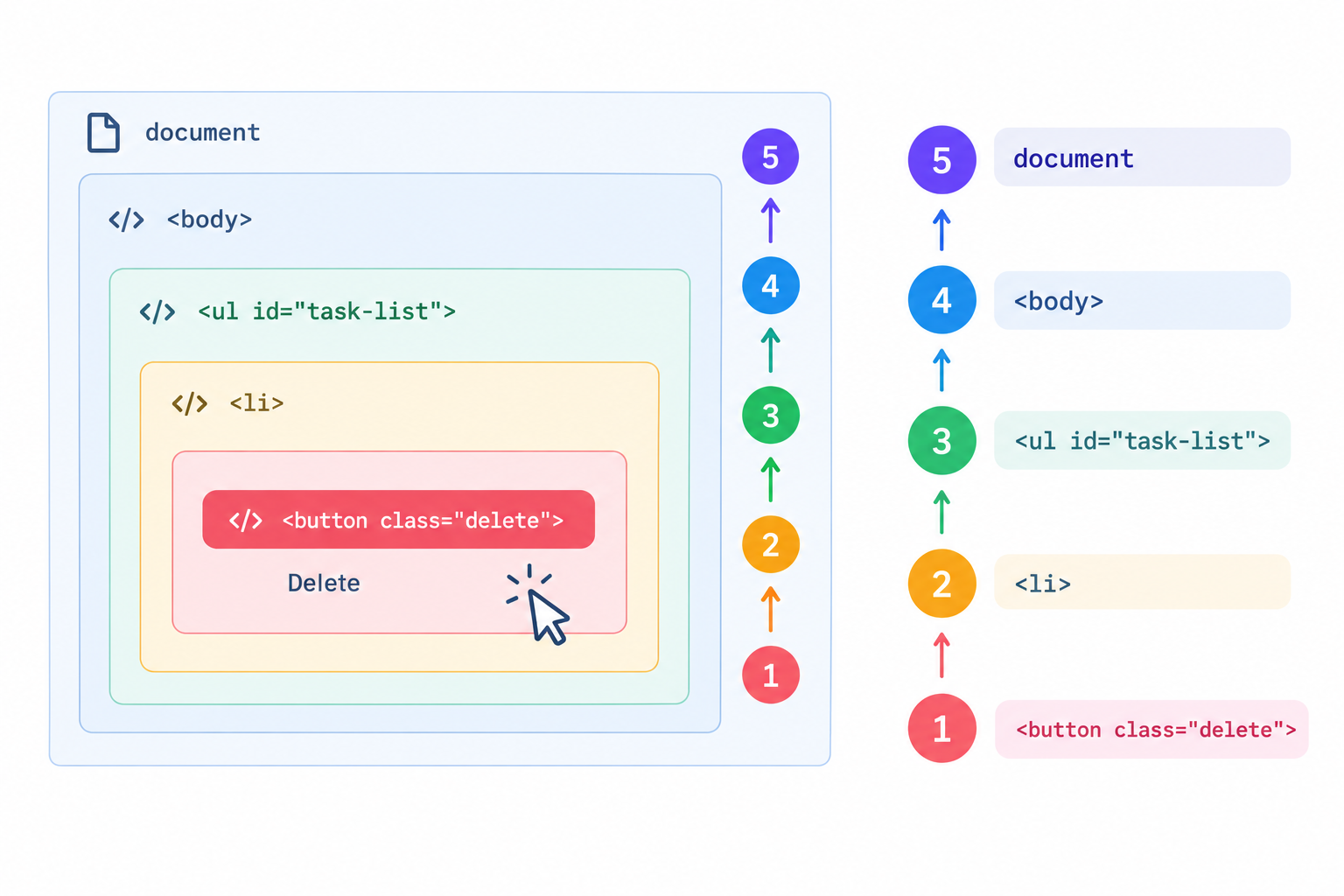
That behavior turns out to be especially useful once you start building interfaces where elements are created and destroyed dynamically.
The Dynamic Element Problem
When you're first learning to build interactive pages, attaching event listeners directly to elements feels like the natural approach. Suppose you have a task list with a delete button on every task; you could simply find all the existing buttons and bind a handler to each one:
document.querySelectorAll('.delete').forEach(button => {
button.addEventListener('click', deleteTask);
});
This works fine for elements that already exist at the moment the code runs. The trouble starts once the interface becomes dynamic. Imagine the user adds a new task through JavaScript:
const newTask = document.createElement('li');
newTask.innerHTML = `
<span>Learn event bubbling</span>
<button class="delete">Delete</button>
`;
document.querySelector('#task-list').append(newTask);
That new delete button has no listener attached to it, and the problem isn't that the browser forgot how clicks work — it's that the element simply didn't exist yet when the original listeners were registered. You could work around this by re-binding a listener every time a new task is added, but as an application grows, constantly hunting down new elements and wiring up fresh listeners becomes tedious and error-prone.
Using Event Delegation
A cleaner approach takes advantage of bubbling directly: instead of attaching a listener to every individual child, you attach a single listener to a stable parent element and let the event bubble up to it. This pattern is called event delegation. For our task list, the <ul> is a natural place to listen, since it's an ancestor of every task item, present and future:
const taskList = document.querySelector('#task-list');
taskList.addEventListener('click', event => {
if (event.target.matches('.delete')) {
event.target.closest('li').remove();
}
});
With this in place, individual delete buttons no longer need their own listeners at all. When a button is clicked, the event bubbles up to the <ul>, where the single handler inspects event.target to figure out where the interaction actually originated. If that target matches .delete, the handler knows a delete button was clicked and removes the corresponding list item; if the user clicks somewhere else inside the list, the handler simply does nothing.
This is really the core advantage of delegation: the listener doesn't need to exist on a child element at the moment that element is created, because it's already sitting on the parent, waiting. When JavaScript later adds another task and its delete button, that button automatically becomes part of the same DOM hierarchy, and a click on it bubbles up to the same <ul> listener that's been there the whole time. No new binding required. This makes the pattern particularly well suited to interfaces where elements are frequently added or removed — task lists, menus, tables, comment sections, and similar dynamically generated UI components.
event.target vs. event.currentTarget
Working with delegation makes one distinction unavoidable: event.target and event.currentTarget are not interchangeable. event.target refers to the element where the event actually originated, while event.currentTarget refers to the element whose listener is currently executing. In our example, clicking the delete button means event.target will point to the <button>, while event.currentTarget will point to the <ul>, since that's where the listener itself lives. The event originates on a descendant, bubbles upward, and is ultimately handled by a listener attached to an ancestor — keeping that distinction straight is central to reasoning correctly about delegated events.
Stopping the Bubble
Bubbling is usually desirable, but there are moments where you want an event's journey up the DOM to stop early. Suppose clicking anywhere on a task item toggles its completed state, but clicking the delete button inside it should remove the task instead, without also triggering that toggle. Calling event.stopPropagation() inside the delete handler prevents the event from continuing on to the parent <li>:
button.addEventListener('click', event => {
event.stopPropagation();
deleteTask();
});
This should be used sparingly, though. Stopping propagation prematurely can silently break other delegated listeners further up the document tree that were relying on that event reaching them.
Capturing: The Other Half of Propagation
Bubbling is actually only half of the propagation story. Before an event bubbles upward, it first passes through an initial phase called capturing, sometimes referred to as the trickling phase. In full, an event's journey has three parts: it starts at the very top of the document and trickles down through ancestors during the capture phase, reaches the element where the interaction occurred during the target phase, and then travels back up through those same ancestors during the bubble phase.
By default, .addEventListener() only reacts during the target and bubbling phases. If you need a parent to intercept an event before it ever reaches a child, you can opt into the capture phase by passing { capture: true } as a third argument:
document.addEventListener('click', handleCapture, { capture: true });
In day-to-day development you'll lean on bubbling and delegation far more often than capturing, but knowing that events travel down before they travel back up rounds out a complete mental model of how DOM propagation actually works.
Interactive Demo
To see delegation working end to end — including a task list where new items are added dynamically and deleted through a single shared listener — I put together a working example on CodePen. In the demo, entering a task appends it to the DOM at runtime, yet no new click listener is ever attached. A single handler remains on the parent #task-list container, and whenever a delete button is clicked, whether it was there from the start or created seconds earlier, the click bubbles up to that container, where the handler checks event.target.classList.contains('del-btn') and removes the matching <li>.
The Bigger Picture
It's worth keeping event bubbling and event delegation conceptually separate, even though they're closely related. Bubbling is a mechanism of DOM propagation — it describes how an event moves upward from its target through its ancestors. Delegation is a programming pattern that takes advantage of that mechanism by placing a single listener on an ancestor rather than on every individual descendant. The DOM hierarchy itself runs from parent to child, but a bubbling event travels the opposite direction, from the element where it originated toward its ancestors, and the browser handles that propagation automatically. Your code simply decides where along that path it makes sense to listen.
Conclusion
Once you understand that a click doesn't stay confined to the element it started on, event delegation stops feeling like a trick and starts feeling like the obvious way to handle dynamic interfaces. Rather than treating every button as something that needs its own listener, you can think of the DOM as a path the event travels upward through, and choose a single, stable point along that path to listen from. For any application where elements are added, removed, or re-rendered on the fly, that shift in thinking will save you a considerable amount of rebinding — and a fair number of bugs.