Balancing Decision, Assignment, and Formula Elements in Salesforce Flow
One of the more common architectural decisions when designing a Salesforce Flow is determining where business logic should live. Should it be represented visually through a series of Decision and Assignment elements, or should complex logic be consolidated into one or more Formula resources? There is no universal answer here — the better choice depends on the complexity of the logic, who will be maintaining the Flow, how often the business rules change, and how important it is for that logic to be understood by people who aren't developers.
A useful way to frame the choice is to let the canvas describe the process while letting formulas calculate the information that process needs. That principle, as we'll see, leads naturally toward a hybrid design rather than a strict either/or.
Representing Logic Visually
The most direct approach is to represent business rules right on the Flow canvas, using Decision and Assignment elements for each condition. Imagine a Flow that needs to classify an Account: is it a customer, and if so, does its revenue put it in the Enterprise tier or the Standard one?
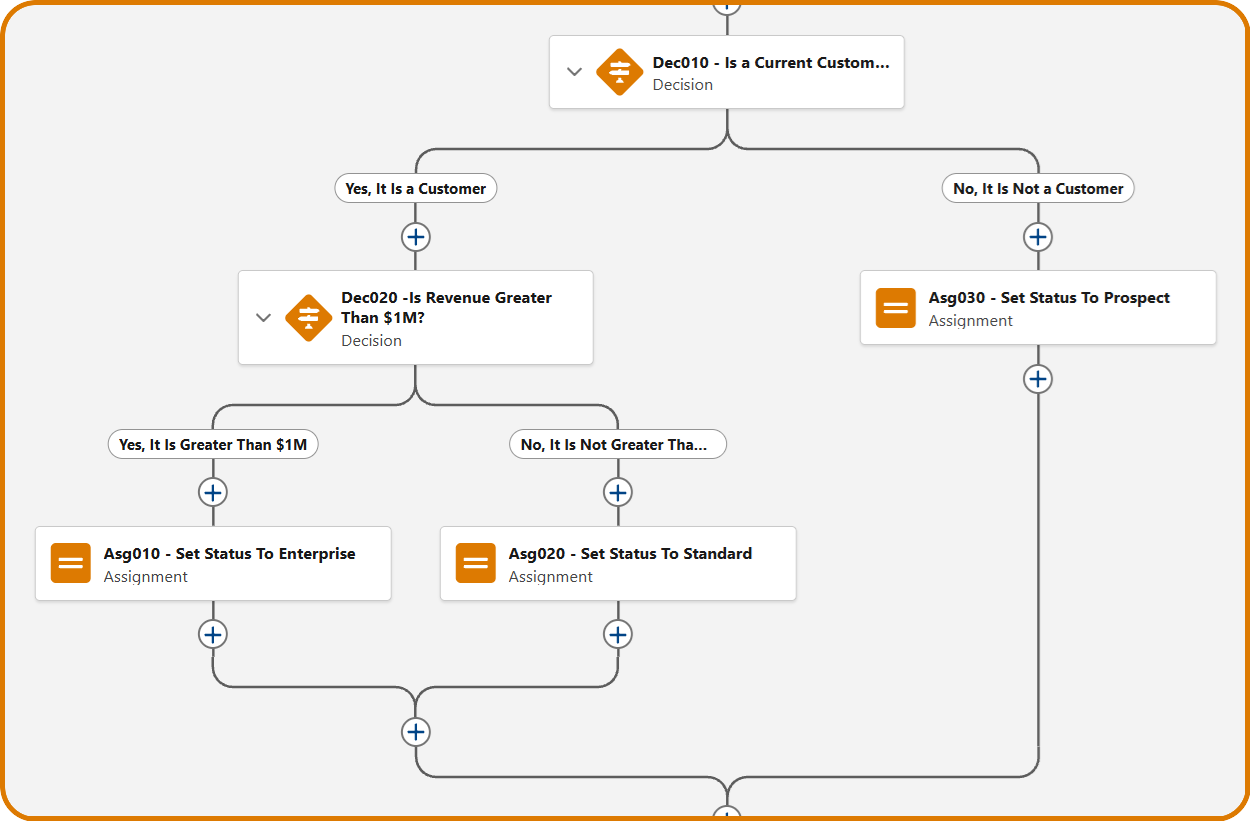
The advantage of this style is that the logic is visible. An administrator or business analyst can open the Flow and follow the decision path without needing to understand formula syntax, which matters most when the Flow represents a business process rather than pure data manipulation — a BA reviewing the path above can tell at a glance whether it matches the documented requirement. Visual branching also gives you useful checkpoints during troubleshooting: instead of asking why a large formula returned false, you can ask why a specific Decision, labeled in plain business language, took the path it did. That distinction matters more than it might seem, since diagnosing a mislabeled branch is a very different task from unpacking a nested boolean expression.
The trouble with this approach shows up as the Flow grows. A few Decisions are easy to follow; twenty branching elements start to turn the canvas into a maze that documents how the implementation was built rather than what the business process actually does. It also invites duplication — if several parts of the Flow need to know whether an Account counts as an "active customer," that condition can end up repeated across multiple Decision elements, and if the definition ever changes, every copy needs to be found and updated. Left unchecked, a Flow can quietly develop several slightly different versions of what was supposed to be a single business rule, and reorganizing a large, deeply branched Flow later on becomes its own kind of technical debt.
Centralizing Logic in Formulas
The alternative is to move some of that logic into a Formula resource, so the Flow calculates a value once and reuses it, rather than reasoning through the same conditions in several places on the canvas.
// Formula: IsEligible
IF(
AND(
Account.Status = "Active",
Account.Type = "Customer",
Account.AnnualRevenue > 1000000
),
TRUE,
FALSE
)
Here, the formula is responsible for calculating the answer, while a single Decision downstream is responsible for routing the process based on that answer. This keeps the canvas cleaner — instead of several Decisions representing pieces of a calculation, the Flow can contain one logical step, like "Calculate Eligibility," followed by "Determine Path." It also centralizes the definition: IsEligible becomes the one place that condition lives, rather than a set of conditions copied wherever it's needed, and formulas tend to be a more compact way to express logic that's primarily computational — date math, numeric comparisons, and text manipulation are all cases where several visual elements would otherwise be needed to represent a single expression.
The cost is that formula syntax introduces a more programming-like layer into a tool that's often used by administrators who are comfortable dragging elements onto a canvas but less comfortable reading nested AND() and ISPICKVAL() expressions. That doesn't mean formulas are inherently a developer-only tool — plenty of admins work with them regularly — but the team's actual comfort level is worth considering before leaning on them heavily. There's also a transparency cost: a Formula resource can hide a fair amount of business logic behind a single name, so while a Decision that reads IsEligible = TRUE is trivial to follow on its own, a maintainer still needs to open the formula to find out what "eligible" actually means. That's not necessarily bad design — it's abstraction, and abstraction is only a problem when the name is vague or the underlying rule is undocumented. The real risk is replacing a tangled Flow with an equally tangled formula: a two-hundred-line nested IF() statement is still technical debt, even if it reduced the element count on the canvas. The complexity hasn't gone away; it's just moved somewhere less visible.
The Developer Perspective
Developers and administrators tend to approach this trade-off from different starting points, and it's worth understanding both, since most Flows end up maintained by a mix of the two.
A developer's instinct is to separate responsibilities the way they would in any codebase: a Formula should answer a calculation question ("Is this customer eligible?"), a Decision should answer a routing question ("Where does the Flow go next?"), and an Assignment should answer a state question ("What value should this variable have?"). That division mirrors general separation-of-concerns principles, and it gives each element on the canvas a single, clear job.
The Admin and BA Perspective
An administrator or business analyst, on the other hand, tends to measure maintainability by how quickly they can map the Flow back to the business requirement as written. Given a rule like "a customer receives the Premium classification when the Account is active, annual revenue exceeds $1 million, and there's at least one open Opportunity," a BA will usually find a Decision labeled Is Premium Customer? easier to validate at a glance than the equivalent formula spelled out in full, even though the formula is more concise. The Decision's label carries the business intent directly; the formula requires a bit of translation first. The practical takeaway is to optimize the Flow for whoever will actually maintain it, not just for the person who built it — a developer might be perfectly comfortable with a dense formula, but if the Flow's long-term owners are administrators, that same formula can quietly become a maintenance bottleneck.
A Hybrid Approach
In practice, the strongest Flow architectures rarely pick one approach exclusively. A common and effective pattern is to let Formula resources derive the values the process needs, then use a single Decision to route based on those derived values, with Assignments handling whatever state changes follow.
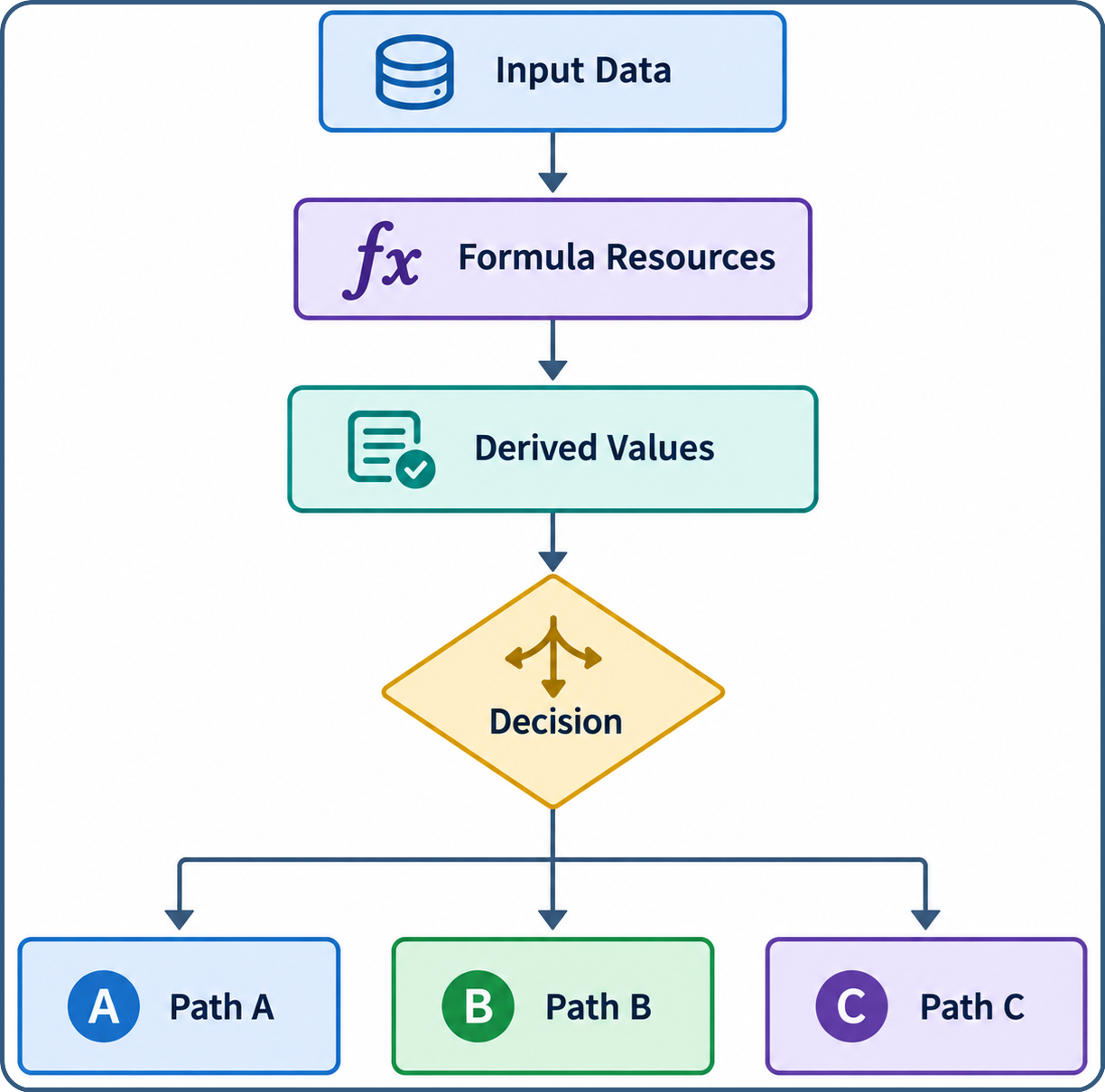
Applied to the classification example from earlier, instead of chaining together several Decisions — is the Account active, is revenue above a threshold, does it have an open Opportunity, is it flagged as strategic — the Flow can derive a single CustomerClassification value up front and then branch once on the result:
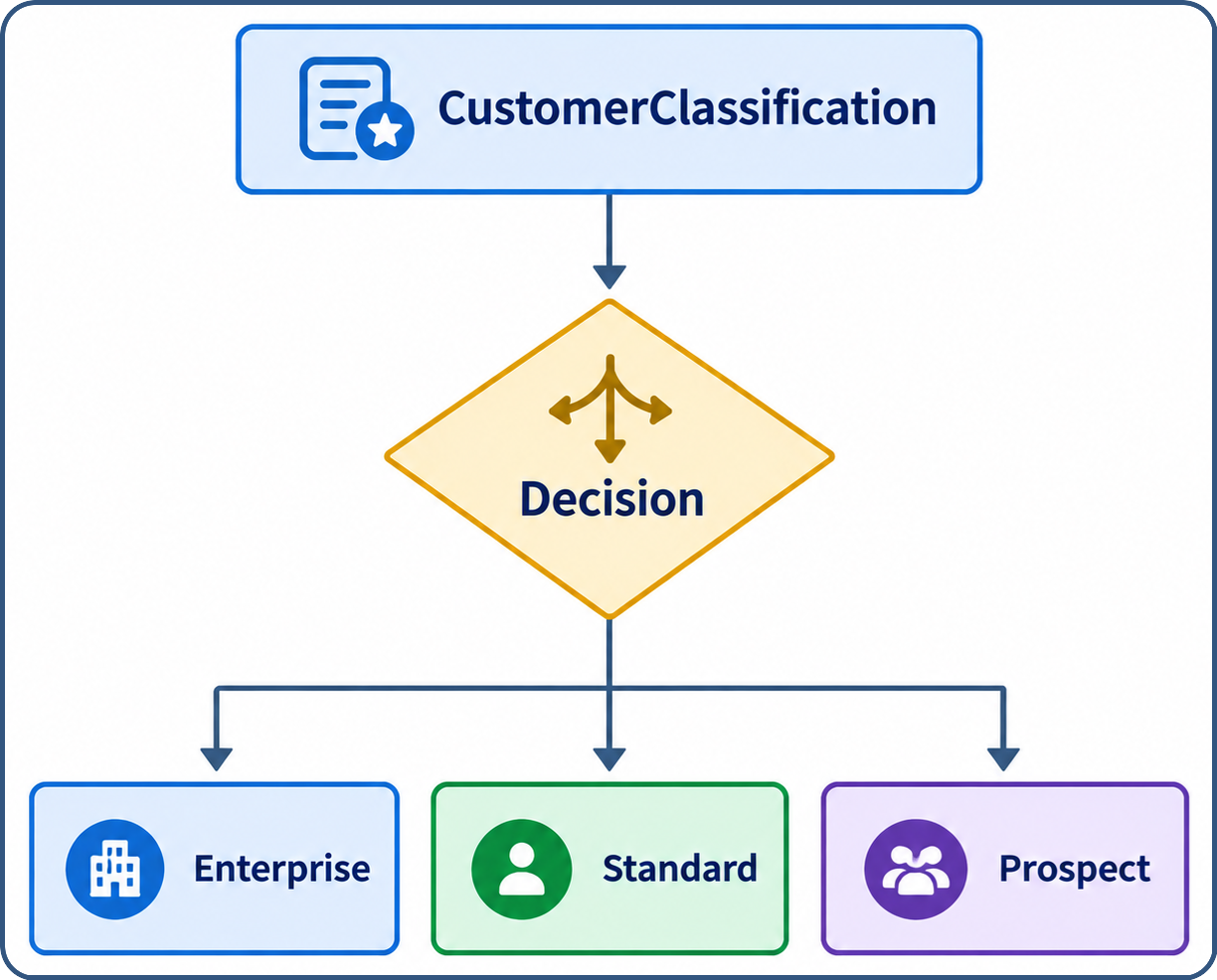
The canvas now reads as the business process, while the formula holds the calculation used to arrive at that classification.
Avoiding the One-Formula Trap
It's worth being careful, though, not to let the hybrid approach collapse into "put everything into one giant formula" — that just relocates the spaghetti rather than untangling it. Smaller, well-named formulas like IsActiveCustomer, HasOpenOpportunity, and CustomerClassification are generally easier to reason about, and to debug, than a single formula named something like CalculateEverything. When the final classification looks wrong, being able to inspect each of those intermediate values individually is far more useful than staring at one large nested expression and guessing which branch misfired.
When to Reach for Each
Visual Decisions are still the better choice when:
- the number of conditions is small;
- each branch triggers a meaningfully different downstream process; or
- business stakeholders need to review the logic directly.
An Order Status Decision branching into Cancel, Approval, and Fulfillment processes, for instance, gains little from being hidden inside a formula. Formulas earn their keep on the other side of that trade-off, when:
- the logic is primarily computational;
- the same derived value is needed in multiple places; or
- a calculation can be given a clear business name.
Something like DaysSinceLastContact or CalculatedDiscount is more useful surfaced as a single named value than spread across several branches.
A Note on Performance
It's tempting to treat element count as a proxy for performance, but reducing the number of Decisions or Assignments on a canvas doesn't automatically make a Flow faster. What actually matters are the expensive operations — Get Records, Create Records, Update Records, Delete Records — and those deserve far more scrutiny than how many branches a Flow has. A Flow with several lightweight calculations is often preferable to a leaner-looking one that performs unnecessary database operations. Formulas are best used to improve logical organization and maintainability, not simply to shrink the element count.
Documentation Matters More as Logic Becomes Abstract
That trade-off does come with an obligation, though: as more logic moves into formulas, the canvas alone stops telling the whole story, so naming and documentation matter more, not less. A Decision that reads Is Eligible = TRUE is only as useful as the formula behind it is well-named and well-documented — something like IsEligibleForPremiumSupport, with a short description of what "eligible" actually means, keeps the abstraction from turning into a black box. That habit becomes especially important in orgs where administrators and developers share ownership of the same automation.
Conclusion
The goal isn't to minimize the number of Flow elements or to maximize how much logic lives in formulas — it's to make the automation understandable and appropriately abstracted for the team that actually owns it. A well-built Flow should let someone unfamiliar with the original implementation figure out fairly quickly what the Flow is trying to accomplish, why it took a particular path, and where they'd go to change the underlying business rule. In most cases, that means combining both approaches: formulas to derive the values a process depends on, Decisions to route based on those values, and Assignments to carry out the resulting work — giving developers the separation of concerns they expect, while preserving the visual transparency that makes Flow genuinely useful to the administrators and analysts who maintain it day to day.